Unlock async communication for engineering teams - Part 2
How many people could leave your team before delivery suffers? Before you can no longer support what you run? That's the bus factor, and working it out is sobering. Teams adapt, but it would be better if a departure added no cognitive load for the people left, velocity didn't drop and the team handled incidents just as well.
That's one of many reasons to capture and share information asynchronously. The faster an organisation moves, the shorter its long-term memory. Think of a sliding window that moves forward but never widens. The remedy is to write things down.
Former HP CEO Lew Platt put it well:
If only HP knew what HP knows
Taking action
Part 1 covered improving meetings with async tools and processes. This part is about how to push for async: getting started, and building the habits that make it part of your daily toolset.
1. Start with why
Motivation and tooling aren't enough without buy-in from your team. Without it, you're putting the cart before the horse. Everyone needs to see the value.
Simon Sinek's Golden Circle helps here. Start by defining a why that explains the purpose and the benefits.
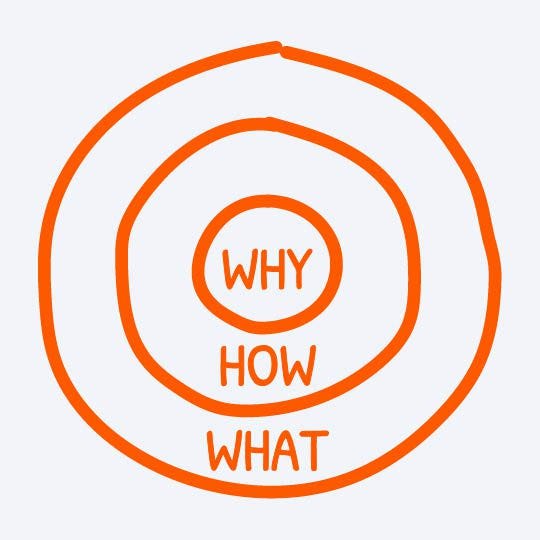
For async, that might look like:
- Why (the purpose). The reason you're doing this, and it has to mean something to everyone involved: more inclusivity, less repetition, fewer knowledge silos. It shouldn't just be a procedure, something you do, but serve something strategic, a mission. Automattic, the company behind WordPress, uses both async and the Golden Circle. Its why is access to a global talent pool and continuous productivity.
- How (the process). The tools, and how they'll be used to serve the why.
- What (the outcome). The results, such as shorter meetings or more innovation. Keep it to a single sentence with a few lasting, purposeful outcomes. If you can't discuss and measure them, you won't know whether it's working.
2. Get good at writing

Written words are the number one tool for transferring information. In the right medium, a document can be read by millions of people over months or years. It can be versioned, edited, revisited, translated, searched and shared around the world in seconds.
Writing is hard, but it's what makes async work. Like going back to the gym after a long break, it's difficult at first and gets easier. When it doesn't feel worth it, go back to your why. Is it to support people who are neurodivergent, non-native English speakers or introverted? Remind yourself of that when you don't want to write.
Writing and recording bring more people into the conversation and capture perspectives that would otherwise be missed. Video deserves a mention too, because it captures non-verbal cues, tone and demonstrations. Writing comes first, but recordings are still on the podium.
3. Kill the mouse
In a meeting with two screens, one showing the call and the other a Google Doc, you don't need your mouse unless the session is interactive. A mouse is for navigating, and you don't need to navigate. All it invites is distraction: email, messages, that unit test that won't pass. Put it out of reach.
4. Create an information hub
The information needs a home, and where depends on your tooling. What matters is agreeing where things live and how they're structured (the how). For example:
- Meeting minutes. Record the outcomes. Avoid AI note-taking at first, so you have a benchmark to compare against. Then check whether the tools capture key points and actions more accurately, and whether the notes are searchable and summarised. That lets the team make an informed decision.
- Architecture decision records (ADRs). Teams often struggle to keep them up, but they give context and save a lot of time piecing together how a service evolved. Find a system that works for your team. If keeping ADRs in the project's directory doesn't work, link to them from the README instead.
- Stakeholder decisions. If goals and agreed timelines aren't written down, you'll get into trouble and create pressure nobody needed. Ever played the telephone game? Without a record, you're playing it without realising.
- Pull requests. Linking PRs alongside everything above creates an audit trail showing how each change relates to a business decision.
- Ideas. Write them down and put them in the hub so the team can review them in their own time. The more complex the idea, the harder it is to discuss on the spot, so give people time to think before talking it through.
There's more to cover, but that's a good start. Work out what you need to know first, define simple templates, and make recording information easy and frictionless.
5. A mantra
Once you've decided what to record (start small), the hard part is remembering to record. A few habits help:
- Ask who's writing. At the start of any meeting or discussion, agree who's capturing it. Write straight into the agreed tool, not a local notepad, or it may never get transferred.
- Read it back. Where it's worth it, the writer summarises their notes at the end. It takes 30 seconds, checks the information is right and gives everyone a recap.
- Post it somewhere. When you add a document to the hub, also post it in a dedicated chat channel for async updates. That gives a timeline of discussions and records.
6. Respond with a link
When someone asks for something you'd have to explain, in any medium, write it down and send a link. Commit to this, and over time you build up context and history that save everyone time. It's an investment that pays dividends.
It also means people get the same answer every time, not a slightly different recollection of your thoughts each time you repeat them.
Moving to async isn't easy, but a clear purpose and a commitment to change are a strong start. People imitate, so lead by example and others will follow.