Handling Zendesk events via EventBridge
Note: Since this was written, Zendesk has announced it will deprecate its partner EventBridge integration in December. A webhook into EventBridge replaces it, and the architecture below applies to any event broker integration.
Zendesk is a customer service platform for managing and resolving customer enquiries. When a customer talks to our chatbot in Zendesk, we already know some of what happened, such as which order they looked up and when the conversation reached a resolution. We add that as metadata to the ticket, which saves the support team time.
The catch is timing. Zendesk creates tickets after a variable delay, so there's no knowing when a ticket will exist to enrich.
The problem
The first version polled for it. Polling is common but wasteful: every call that finds nothing still counts against Zendesk's API rate limit and costs infrastructure, and data arrives up to one interval late.
Zendesk's EventBridge partner connector removes the need to ask. Instead of us checking whether a ticket exists, Zendesk tells us when something happens.
Amazon EventBridge is a serverless event bus. It takes events from many sources, filters them with rules and routes them to many targets, so producers and consumers don't need to know about each other.
The architecture
The first design uses AWS serverless services throughout:
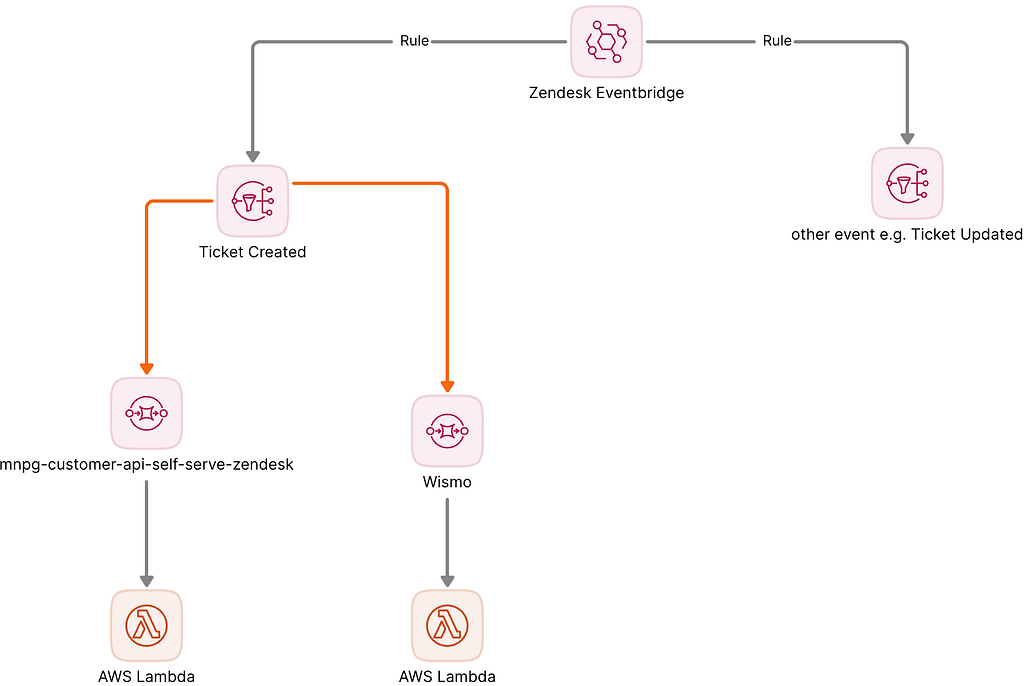
- EventBridge is the bus. The Zendesk connector feeds events into our account, and rules filter and transform them by matching on the event's shape.
- SNS publishes business domain events, so other services can subscribe to them.
- SQS → Lambda processes them. The queue decouples the Lambda from the producer, adds retries and means the producer doesn't change if the consumer does. The Lambda can call other services for extra data.
This handles two events on one resource, the ticket. Zendesk publishes over 100 events across all of its resources. Would the same design cope with all of them? Yes, but that doesn't make it the best design.
Shipping the smallest useful piece first is the right call, because it's how we learn. But the trade-offs matter if this design becomes the template for an organisation that follows the AWS Well-Architected Framework.
The trade-offs
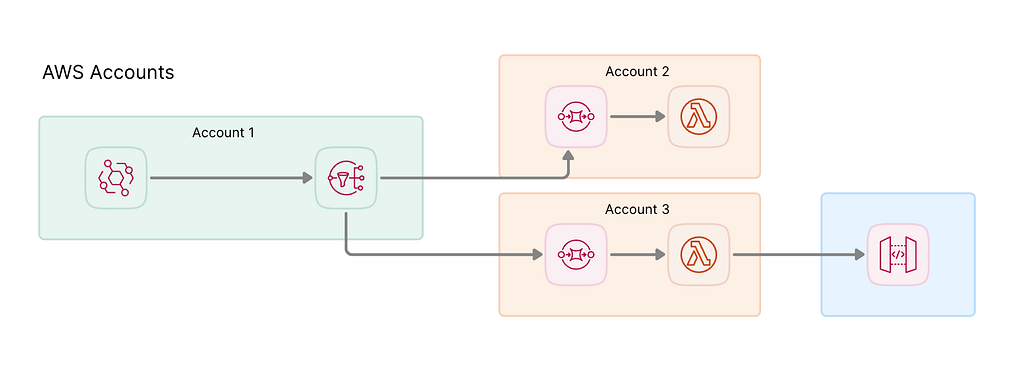
- Subscriptions are managed by hand. Every new consumer needs an SNS subscription. The services are decoupled at runtime, but each change still goes through the topic, which slows teams down and adds maintenance.
- Consumers have little say in what they receive. The topic decides what each consumer sees, not the consumer.
EventBridge to EventBridge
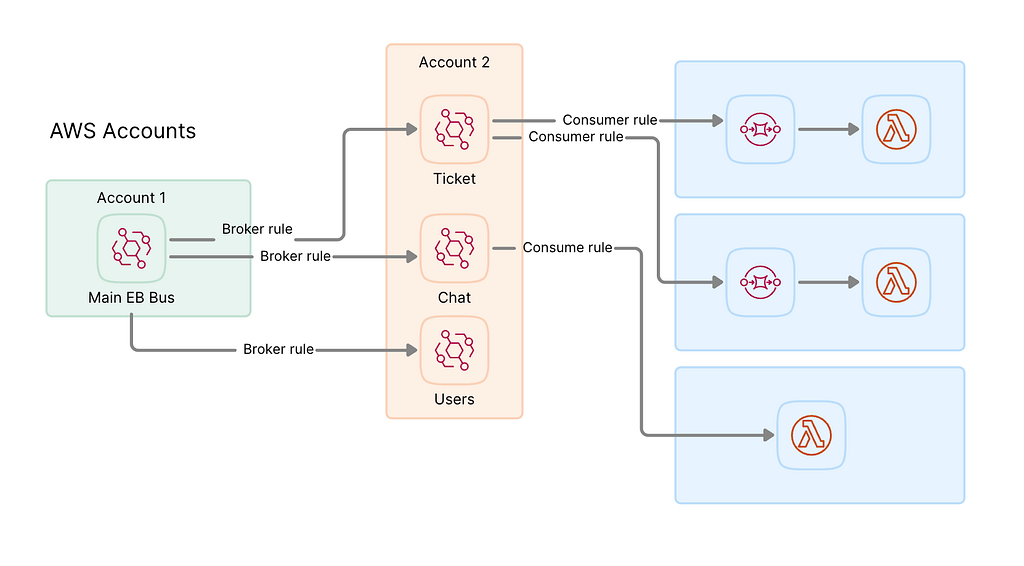
Instead, the central bus forwards broad entity events to each consumer's own EventBridge, which can live in another account. This:
- Removes the SNS subscriptions. Adding a consumer doesn't touch the producer.
- Keeps routing simple. Events go straight to the target account's bus.
- Lets each consumer write its own rules and targets. A consumer only pays to process the events it cares about.
For example, a service may only care about tickets tagged
foo or bar. With its own bus, it writes a rule
for those tags and never sees the rest.
Where the filtering happens matters. Putting highly specific patterns on the central bus in Figure 1 would be an anti-pattern: one bus collecting every consumer's rules is hard to maintain and debug. Keep the central rules broad and let consumers be specific.
Implementation
We build this with OpenTofu, but the steps below use the AWS console to stay tool-agnostic. They assume:
- The Zendesk connector is set up and its events reach your EventBridge.
- An SNS topic, or another target an EventBridge rule supports, exists.
The steps:
Go to EventBridge > Rules > Create rule and name it
ticket-status-changed.Under Event source, select Other.
Skip Sample event for now. It's useful later, for finding existing patterns and testing yours against real data.
Under Event pattern, choose the event to receive. Choose carefully: depending on your Zendesk workflows, the data you need may not exist yet when an event fires, and an event-driven consumer doesn't get a second look. We use the status change event:
{
  "detail-type": ["Support Ticket: Custom Status Changed"],
  "resources": ["Support Ticket"]
}
Set prefix matching in the dropdown.
Choose a target. We use SNS, but Kinesis, Lambda or another EventBridge bus work too.
Test the rule. The event is a snapshot of the entity at the moment it changed, so check it carries the data you need.